Your Mac keeps track, so you don’t have to.
Hyplr finds and tracks bills, deliveries and deadlines buried in your files and mail — and brings them up before they become a problem.
Hyplr is coming to the Mac.
On your Mac (Apple silicon, macOS Tahoe 26 or later) — bills and payments matched automatically, no bank connection or manual entry.

Found where they already are.
Your bills end up everywhere: in Gmail and Apple Mail, in Downloads, as screenshots on your Desktop, in your cloud drives. Hyplr reads them where they are. There’s nothing to type or forward.
About 4 min left
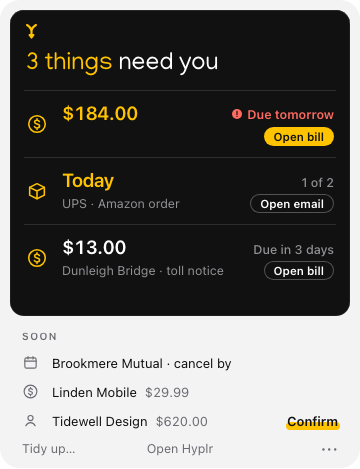
3 things need you.
3 things need you.
Bills
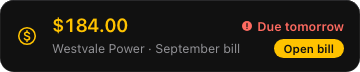
The amount due, the due date and who it’s from — and when paying early costs less, by when and how much.
Deliveries
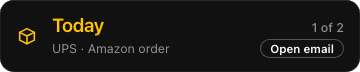
What’s coming and when, from the emails shops and carriers send — no tracking numbers to add.
Deadlines
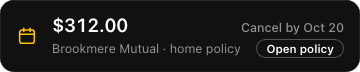
Renewals, cancel-by dates and free-trial ends, from the contracts and notices you already have.
One bill, one card: the email “Your bill is ready” and invoice_4471.pdf in Downloads are the same bill, and Hyplr shows how it knows — invoice no. 4471 and $184.00.
Paid? Hyplr shows the proof.
-
Westvale Power’s bill, $184.00, is due Oct 6.
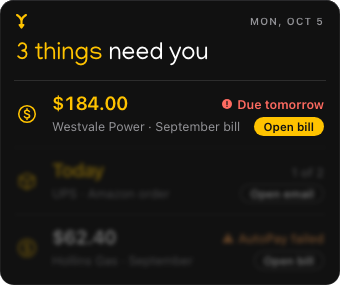
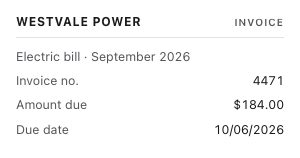
The bill · invoice_4471.pdf · Downloads
-
On Oct 5, Westvale Power’s payment confirmation arrives.
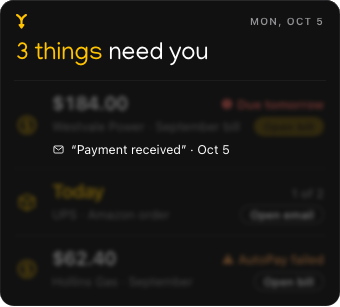
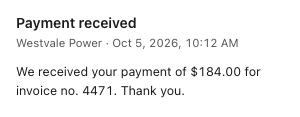
The email · Gmail · Oct 5, 10:12 AM
-
Hyplr matches it to the bill and asks: “Looks paid?” Confirm, and the card closes with the proof kept.
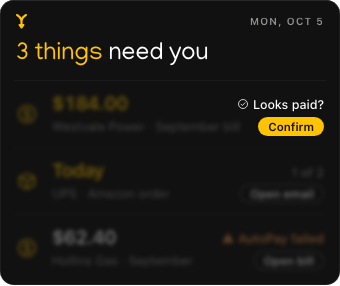
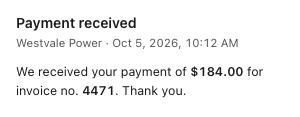
The proof · matched by invoice no. 4471 · $184.00


- Proof found — it asks: “Looks paid?”
- No proof — the bill stays until you mark it paid.
Every close can be brought back.
One glance in the menu bar.
Hyplr’s icon stays quiet until something needs you, then shows two bars. Click it to see what to do now and what’s coming.

Now — what to act on: a bill due in 3 days, a package arriving today, a date to cancel by.
Soon — what’s coming next, with its date.

At most one notification a day, between and — with counts, never amounts or names.
A weekly summary, on the day you choose.
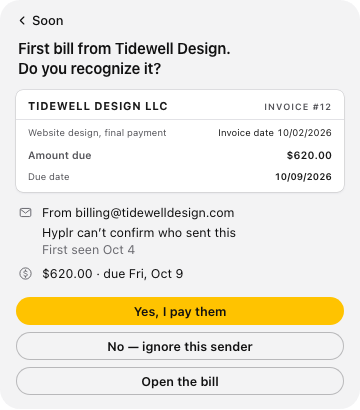
Careful where money is involved.
A bill is money, so Hyplr asks before it trusts anything new.
Someone new?
A first bill from a new supplier waits for one click: do you recognize it?AutoPay
Bills on AutoPay show as paid, never as bills to pay. If a payment fails, it becomes one.Old bills
A bill that was overdue before Hyplr found it is never shown in red. Hyplr can’t see your bank, so it asks instead of guessing.Links in emails
Hyplr never pays anything and never opens a link from an email. Open bill opens your own document, not a website.
No bank login. Reading stays on your Mac.
Many money apps work from the bank and card accounts you link. Hyplr reads the bills themselves. Your files and mail are never sent anywhere to be analyzed.
These are the words Hyplr shows you before you connect Gmail:
- What Hyplr reads
- Your emails and their attachments: the last 90 days, then each new one. It skips Spam, Trash and Drafts.
- What for
- To find bills, deliveries and deadlines, and the emails that prove a bill was paid. Nothing else.
- What it keeps
- The amounts, dates, senders and subjects it found — never copies of your emails. Encrypted on this Mac.
- Where it goes
- Your Gmail goes from Google straight to your Mac; our servers never see it or your sign-in.
- Your sign-in
- Saved in this Mac’s keychain. Sign out in Settings at any time.
Hyplr can’t change, delete or send your mail.
Your files are read the same way: on your Mac, and reading never moves or changes a file.
What changed at home this month.
Hyplr adds up the month’s bills and documents by category, and compares each with your own past — never anyone else’s.
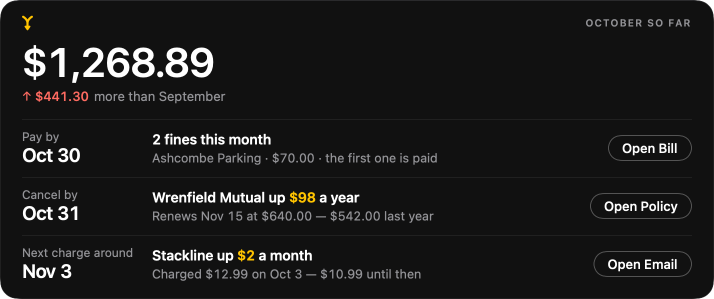
- Which bills went up, and by how much.
- What came again — a second parking fine, another payment reminder.
- What to do about each, and by which date.
From your bills and documents · Hyplr can’t see your bank or card
See what Hyplr finds. Then decide.
When Hyplr is out, your first summary is free: what’s already handled, then what needs you — like
23 of 26 bills are already paid. 3 things need you.
Then a free week with no card, starting only when you choose.
Questions
Does Hyplr read all my mail?
From Gmail, it reads the last 90 days and each new email, and skips Spam, Trash and Drafts. From Apple Mail, the last 90 days and new mail too — in every account in Mail. It doesn’t read Outlook on the web or other mail apps.
What if Hyplr gets something wrong?
Every card shows why: the document and the email it came from, with the matched values marked. Fix a value, say it’s not a bill, or unlink two things — Hyplr remembers. When Hyplr isn’t sure, it asks first.
Will Hyplr move or change my files?
Reading never moves or changes a file. The one thing that moves files is Tidy up, and only when you start it: you see every move first, nothing is deleted, and Undo puts files back — free, at any time.
Doesn’t my Mac or Gmail already do this?
Your Mac can find a file when you ask for it, and Gmail can point out some bills and packages inside Gmail. Hyplr works across your files and all the mail you connect at once, speaks up when something is due, and links each bill to its payment.
Which Macs does Hyplr run on?
Macs with Apple silicon (M1 or later) and macOS Tahoe 26 or later. Apple Intelligence is optional: with it on, Hyplr finds more. Intel Macs can’t run Hyplr.
Your files, hyperlinked.
Hyplr is coming to the Mac.
On your Mac (Apple silicon, macOS Tahoe 26 or later) — bills and payments matched automatically, no bank connection or manual entry.