From your files and mail to one short list.
On your Mac, Hyplr reads the folders and mail you allow, shows you where you stand, then tells you when something needs you.
What do I have to do?
Allow your folders and mail. That’s the setup.
No bills to type in, and no bank login.

What will it do to my Mac?
Reading stays on your Mac.
Reading never moves or changes a file.
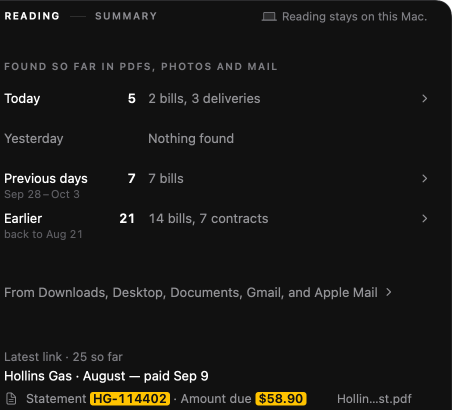
What do I get first?
Where you stand, in one summary.
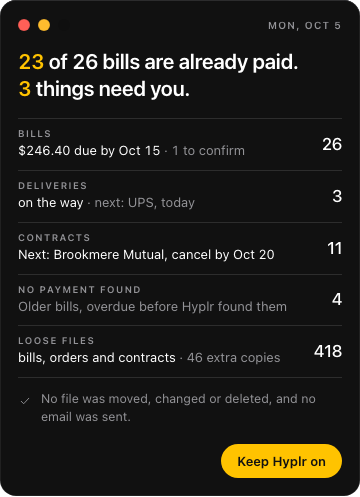
And every day after that?
One short list in your menu bar.
The bill due tomorrow, the package arriving today, the toll that costs $10 less if you pay within 3 days.
One notification a day, at most.

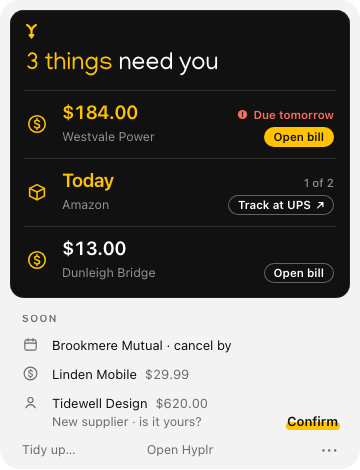
Do I still have to check if I paid?
Paid? Hyplr shows the proof.
When a payment email arrives, Hyplr asks: “Looks paid?” One click closes the bill.


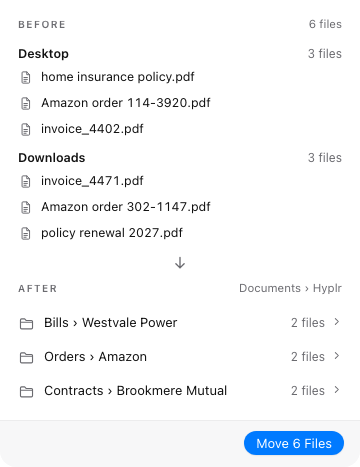
And the bills piling up in Downloads?
One folder per supplier, if you want.
With Tidy up, you see every move first, and Undo puts files back.
What if I stop?
If you stop, nothing is deleted.
Your files and mail stay where they are.
Delete your dataHyplr is coming to the Mac.
When Hyplr is out, your first reading and its summary are free, then a free week with no card. Prices come with the release.
Apple silicon (M1 or later) · macOS Tahoe 26 or later · Apple Intelligence optional