How Hyplr handles your data
Hyplr reads your files and mail to find bills, deliveries and deadlines and, for a company you add, what its clients owe it and its quarter for your accountant. Here is where that happens, what Hyplr keeps, what connects to the internet, and what never happens. The legal text is the Privacy Policy.
Reading stays on your Mac
Hyplr reads the text in PDFs, recognizes text in scans and screenshots, and finds bills, deliveries and deadlines with its own rules, and with Apple Intelligence too, when it’s on. All on your Mac.
With Apple Intelligence on, Hyplr uses Apple’s on-device model, never Apple’s cloud: see Privacy & Security › Apple Intelligence Report.
What Hyplr may open
Each folder only after you allow it. Reading never moves or changes a file.
Never read: code projects, app libraries and app folders. Files kept only in iCloud: their names, sizes and dates, never downloaded.
Gmail
Before you connect Gmail, Hyplr shows you this, in the app:
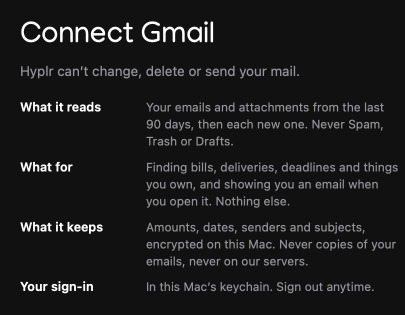
- What it reads
- Your emails and attachments from the last 90 days, then each new one. Never Spam, Trash or Drafts.
- What for
- Finding bills, deliveries, deadlines and things you own, and showing you an email when you open it. Nothing else.
- What it keeps
- Amounts, dates, senders and subjects, encrypted on this Mac. Never copies of your emails, never on our servers.
- Your sign-in
- In this Mac’s keychain. Sign out anytime.
On a Mac where you’ve added a company, the same sheet also says what Gmail is for there: finding the invoices it sent and the payments it received, and gathering its quarter; when you ask, preparing a reminder or the quarter for your accountant with copies of its emails. Hyplr asks you to agree before it uses Gmail for the company. Until you do, the company works from your files and Apple Mail. You can take your agreement back at any time in Settings › General › Who you are.
Before an export for your accountant takes copies of emails that are only in Gmail, Hyplr asks you, once on each Mac: Agree or Not Now. With Not Now, the export is saved without them and its spreadsheet still lists them. You can stop at any time in Settings › Sources.
Your Gmail goes from Google straight to your Mac; our servers never see it or your sign-in.
Hyplr asks Google for one permission, to view your email messages and settings, and nothing else. Hyplr can’t change, delete or send your mail.
You sign in on Google’s own page, so Hyplr never sees your Google password.
Sign Out, in Settings, removes Hyplr’s access at Google, on all your Macs, and forgets what Hyplr found only there. Your mail stays in Gmail.
Google asks every app that reads Gmail to say this, in these words:
Hyplr’s use of information received from Google APIs will adhere to Google API Services User Data Policy, including the Limited Use requirements.
Apple Mail
Apple Mail is read from Mail’s own folder on your Mac, after you choose it in a macOS window. Read-only, every account in Mail. Hyplr reads the last 90 days, then new mail as it arrives.
What connects, and why
What connects to the internet, and what each connection sends, is in the Privacy Policy, section 6.
Remind… and Send to Accountant… send nothing themselves: they open a new message in your mail app, or copy the text for you to paste, and you send it. Hyplr can’t.
Share… on an export you saved hands its zip to the app you pick, such as Mail or AirDrop. Hyplr itself sends nothing.
What Hyplr keeps
What it found (amounts, dates, senders, subjects), never copies of documents or email bodies.
Encrypted on this Mac, with the key in this Mac’s keychain. Your backups follow your own schedule.
For a company you add: its clients’ names and tax IDs and the addresses its invoices print, the payments it received, your accountant’s address if you type it, and the days you opened a reminder. Never a reminder’s text.
A bank statement is used only once you add it for a company. Hyplr keeps each line’s date, description and amount, and the account’s last four digits (never a balance, the account holder or the full account number) until you remove the statement.
Notifications show counts, never amounts or names.
What reaches Digitaleria
Digitaleria S.L. makes Hyplr. When you buy, Stripe (the payment service) passes it your email address, your name, your country (and postal code where a tax needs it), what you bought and paid, whether the payment went through, and your card’s brand and last four digits, never your full card number. Your license is kept on Hyplr’s license server. If you send feedback from Hyplr, Digitaleria gets only your answer, the reasons you picked, what you wrote, the first name you type to be quoted, and Hyplr’s version. Hyplr never sends Digitaleria your files, your mail or what it finds in them.
If you write to support@hyplr.com, Digitaleria gets your email. Support never asks you to send your documents or emails.
What Hyplr never does
- Show ads.
- Sell anything about you.
- Pay anything, or open links found in your mail.
- Connect to your bank.
- Change, delete or send your mail.
- Use your data to judge your credit.
- Let anyone at Digitaleria read your files or mail.
What Hyplr reads, it uses to find your bills, deliveries and deadlines and the emails that prove a bill was paid, to show you a document or an email when you open it in Hyplr, and to gather the things you own with their receipts, manuals, repairs and warranties. When you ask, it gathers a period’s bills and receipts into a folder for your accountant. For a company you add, it also shows what its clients owe it and its quarter, checked against the bank statements you add, and, when you ask, prepares a reminder or the quarter for your accountant, for you to send. Nothing else.
Forget everything
Remove a folder, remove Apple Mail, or sign out of a Gmail account, and Hyplr forgets what came only from it. Not My Company, in Settings › General, stops Hyplr counting a company as yours, and forgets its bank statements; Remove Statement forgets one statement’s lines; Stop Using Gmail… forgets what Hyplr kept from Gmail for your companies.
Delete your dataThis site
This site sets no cookies and runs no trackers.
Hyplr is coming to the Mac.
When Hyplr is out, your first reading and its summary are free, then a free week with no card. Prices come with the release.
Apple silicon (M1 or later) · macOS Tahoe 26 or later · Apple Intelligence optional