Everything Hyplr does.
Bills, deliveries and deadlines — found in your files and mail, kept in one panel.
Bills
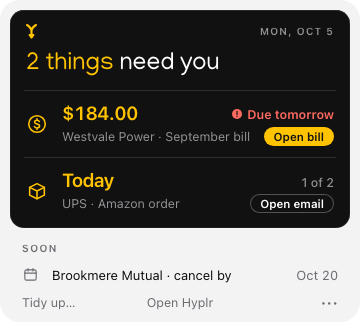
The amount, the due date and the supplier, found in your mail and PDFs — and matched to the payment email when it arrives.
About billsDeliveries
What’s coming and when, from the emails shops and carriers send, with no tracking numbers to add.
About deliveriesDeadlines
Renewals, cancel-by dates and free-trial ends, in time to decide.
About deadlines
The panel
Now and Soon, one click from the menu bar. Snooze what can wait.
The window
This Week for the days ahead; Closed, with how each thing closed; the Map, with every supplier, its bills and documents; Activity, with what Hyplr linked and filed.
Notifications
At most one a day, between and , with counts — never amounts or names. A weekly summary on the day you choose. One note if Gmail or a folder stops working.
Proof and control
Every card shows why. If one is wrong: Unlink, Not a bill, Not mine, Ignore this sender or Bring back. Hyplr remembers your decisions.
Tidy up
Your loose bills, orders and contracts, filed into Documents › Hyplr by supplier — after a preview, with nothing deleted and Undo free forever.
Sources
Desktop, Downloads, Documents, your screenshots and folders you add; Gmail; every account in Apple Mail. Each has its own switch, and removing one forgets what came only from it.
Privacy
How Hyplr handles your dataPlans
A free week with no card, then Pro by the year or month, or a one-time Deep review.
What Hyplr doesn’t do
It doesn’t pay bills, see your bank or send email. It doesn’t sort files you didn’t ask it to. It reads Gmail and the accounts in Apple Mail — not Outlook on the web or other mail apps.
Hyplr is coming to the Mac.
For Macs with Apple silicon and Apple Intelligence, on macOS Tahoe 26 or later.