Deliveries, from the emails you already get.
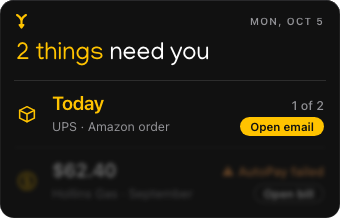
Hyplr reads the order and shipping emails from shops and carriers, and shows what’s coming and when, at the top of your list on the day it arrives.
Nothing to add
Tracking numbers, carriers and expected days come from the emails themselves. Hyplr finds them; you don’t copy anything.
One order, its packages
An order sent in two boxes is one order: “1 of 2”, then “2 of 2”.
On the day
A package moves to Now on the first day it’s expected, or when the carrier says it’s out for delivery. A problem the carrier reports is marked “Delivery problem”. Waiting at a pickup location? “Pick up by Oct 9.”
When it closes
Two days after its expected day, a package closes as “Probably arrived” — and “Not arrived?” brings it back.
What Hyplr doesn’t do
Hyplr knows what the emails say. It doesn’t check carriers’ websites between emails — the carrier’s own tracking link is in its email, one click away.
Questions
Do I need to add tracking numbers?
No. Hyplr finds them in the emails from shops and carriers.
Does it work with my carrier?
Hyplr reads the shop’s and the carrier’s emails, whoever they are. What it can show depends on what those emails say.
Hyplr is coming to the Mac.
For Macs with Apple silicon and Apple Intelligence, on macOS Tahoe 26 or later.